Edit Photos in Flickr

They’ve made it easy to edit your photos right on the Flickr site, with one-click access to Picnik’s photo editing tools. I took it for a quick test drive tonight, and it works pretty well, I made a slight “auto-fix type of change to the photo below, and then saved it back. I was actually pretty happy with the way it made adjustments, and the range of features available.
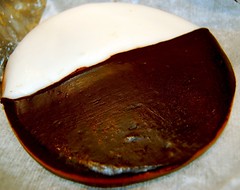
The perfect cookie

The one thing that disappointed me, is that once you make your edits, saving it back to flickr in place of the original image, seemed to take an inordinate amount of time!

I don’t think I’ll be using it all that often, but it’s nice to know it’s there, and, as JR suggested, for photos I upload directly from my cell phone, it’s nice to know that I have a way to do some editing to them!

Technorati Tags: Flickr, PhotoEditing, Picnik

Similar Posts

  • |

    Nikon D3000 At Night

    While I was in Vegas recently for the ILTA conference, I decided that would be a good chance to take the new camera for a spin. Of course, with the conference going on all day, my only opportunity to get out of the hotel was in the evening. I will say, that I was very…

  • Picture perfect

    The local newspaper announced the winners of their annual photo contest and I am very proud that out of 6000 entries, my wife was given honorable mention. Nice job Angela! They’ve run this contest for a few years now, and we generally enter it without much success. The whole process is sort of odd to…

  • |

    Beach Trip

    Just wanted to pass along that I’ve got a couple of pages worth of photos over at the photo blog from our recent trip to Myrtle Beach. While you’re over there, check out the different ways you can follow that site and see new photos as they are posted, by email, RSS, Tumblr or with…

One Comment

  1. i also like the resizing tool of Flickr aside from the easy upload and download interface it provides*”;

Leave a Reply

This site uses Akismet to reduce spam. Learn how your comment data is processed.

To respond on your own website, enter the URL of your response which should contain a link to this post's permalink URL. Your response will then appear (possibly after moderation) on this page. Want to update or remove your response? Update or delete your post and re-enter your post's URL again. (Find out more about Webmentions.)